IPTV Toronto: Complete Streaming Guide for 2026
IPTV Toronto viewers can stream television through compatible Smart TVs, Fire TV devices, Android TV, Apple devices, computers and mobile screens. This guide covers internet performance, Toronto condo Wi-Fi, compatible players, setup, Eastern Time, multilingual viewing and troubleshooting across Toronto and the GTA.
IPTV Toronto generally refers to using Internet Protocol Television in Toronto and the Greater Toronto Area. Rather than receiving television only through a traditional cable or satellite connection, IPTV delivers video using an internet connection to compatible software and streaming devices. For Toronto households, connection quality, Wi-Fi conditions, device compatibility, programme-guide timing and lawful access to content all influence the experience.
What Is IPTV Toronto and How Does It Work?
IPTV stands for Internet Protocol Television. In simple terms, television and video data travel through an IP network and are displayed by compatible software on a television, streaming device, computer, smartphone or tablet.
The basic technology does not change depending on whether you are watching from Downtown Toronto, North York, Scarborough, Etobicoke or elsewhere in the GTA. What does change is the viewing environment: internet connection, Wi-Fi congestion, device hardware and the player application being used.
It is also important to distinguish between an IPTV player and a television service. A player is simply the application that processes and displays compatible streams. Installing an IPTV player does not automatically provide television programming.
If IPTV is new to you, read our What Is IPTV in Canada? guide for a beginner-friendly explanation of IPTV technology, players, devices and services.
For additional background on television delivery options in Canada, the Canadian Radio-television and Telecommunications Commission (CRTC) provides information about television services and viewing options available to Canadians.
Internet Requirements for IPTV Toronto
A reliable connection is one of the most important parts of an IPTV setup. Download speed is useful, but a large speed number does not guarantee smooth streaming. Wi-Fi quality, network congestion, router placement and the streaming device itself can all affect playback.
This is particularly relevant in Toronto apartments and condominiums, where many nearby wireless networks can be active at the same time. A television may therefore receive a less stable wireless connection than a laptop or phone positioned closer to the router.
Test the connection at the television
Do not judge your IPTV connection only from a speed test beside the router. Test where your Smart TV, Fire TV or Android TV device is actually located. Distance, walls and nearby wireless networks can affect the result.
Stable connection
Consistent bandwidth is often more useful for streaming than a very high speed that frequently fluctuates.
Ethernet
A wired connection can remove many Wi-Fi variables when the router and television setup make Ethernet practical.
Strong Wi-Fi
Keep the router well positioned and test the actual signal quality received by your streaming device.
Video quality also affects bandwidth requirements. HD streams generally use less data than higher-bitrate 4K streams. Multiple simultaneous streams increase the total load on the home connection.
If your speed looks good but playback still freezes, use our IPTV Buffering Fix Canada guide to troubleshoot the network, player and device in a logical order.
Best Devices for IPTV Toronto Homes
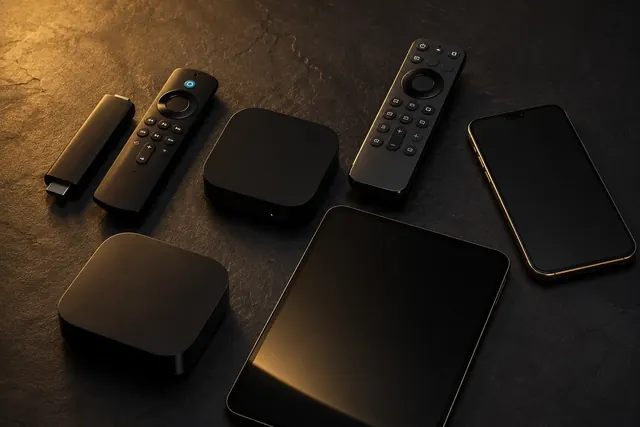
You do not necessarily need to buy a dedicated IPTV box. Many Toronto households can start with hardware they already own. The best option depends on the television platform, available applications and how much flexibility you want.
Smart TVs
A compatible Smart TV can keep the setup simple by running an available IPTV player directly on the TV.
Fire TV & Android TV
External streaming devices can expand the selection of compatible player applications available to a TV.
Apple, Mobile & Computer
Phones, tablets, Apple devices and computers can be useful for secondary viewing or initial testing.
You can choose your own IPTV player
The applications shown in IPTV Canada Hub installation guides are examples and recommendations. You are not required to use one particular player. You can choose another reputable compatible player that supports the login method provided for your authorized service.
Some third-party IPTV players have their own licence or premium-app fee. Any such player fee is separate from the content service.
Compare your options in our IPTV Apps Canada and IPTV Devices Canada guides.
How to Set Up IPTV in Toronto
The exact installation screens depend on your television, streaming device and chosen player, but the overall process is similar. Always use account details supplied specifically for your authorized service rather than copying credentials from online examples or screenshots.
Start with the Smart TV, Fire TV, Android TV device or other screen you expect to use most often.
Use the official app store when available and select a player compatible with the login format you intend to use.
The supported login method depends on the player and service configuration.
A large media library or electronic programme guide can require a short initial synchronization.
Check navigation, several authorized streams, EPG timing and connection stability on the device you plan to use.
Use our IPTV Installation Guides for device-specific help covering Smart TVs, Fire TV, Android TV, Apple devices, Roku, computers, mobile devices, Formuler and BuzzTV.
IPTV Toronto, Eastern Time and EPG Settings
Toronto operates on Eastern Time. This matters when your player displays an Electronic Program Guide, particularly when programming originates in another Canadian, American or international time zone.
If your programme guide appears one or several hours out of sync, check the device's date, time and timezone settings first. Automatic date and time are usually a sensible starting point.
If the television or streaming device is showing the correct Toronto time but the EPG is still incorrect, inspect the timezone or EPG offset settings available inside the player.
If playback works correctly but programme titles appear at the wrong times, investigate timezone and EPG settings before changing network or streaming settings.
Multilingual IPTV Viewing in Toronto
Toronto households can have very different viewing preferences. When a household uses content from multiple countries or languages, organization becomes particularly important.

Instead of focusing only on an advertised total number of channels, check whether the specific authorized programming you want is available and easy to find. Useful player features can include search, favourites, categories and an organized programme guide.
A trial is useful for this purpose. Search for the categories your household actually watches, add favourites and test navigation using the main television remote.
Live Sports and IPTV Toronto Viewing
Live programming places more emphasis on stability because interruptions are immediately noticeable. If sports are an important part of your viewing, test live playback during the trial rather than judging the service only from movies or on-demand content.

Check the programme guide in Eastern Time, test the actual television and network connection you plan to use, and verify that the authorized programming important to you is included. Channel and event availability can change, so it is better to verify the current lineup rather than relying on assumptions.
How to Fix IPTV Buffering in Toronto
Buffering does not always mean your internet plan is too slow. The first goal is to determine whether the issue affects one stream, one player, one device or the entire network.
Recommended troubleshooting order
- Close and reopen the IPTV player.
- Test several authorized streams.
- Restart the television or streaming device.
- Restart the home router.
- Test the connection beside the television.
- Compare Wi-Fi with Ethernet when practical.
- Update the player and streaming device.
- Check Eastern Time and EPG settings if only the guide is incorrect.
If one device freezes while another device works normally on the same connection, investigate the affected device or player first. If every device is having difficulty at the same time, the network or service becomes a more likely place to investigate.
Follow our complete IPTV Buffering Fix Canada: 12 Ways to Stop Freezing guide for more troubleshooting steps.
Choosing an IPTV Setup for a Toronto Home
Before subscribing, confirm that the service works with your main television or streaming device, fits the number of simultaneous screens you need, and performs reliably on your Toronto home network. It is also useful to verify current programming availability, support, pricing and trial terms before making a longer commitment.
Our dedicated IPTV Toronto streaming service guide explains seven practical decision points including device compatibility, internet performance, content needs, EPG, pricing, testing and support.
When you are ready to test your own setup, review our IPTV Canada plans or request a 24-hour free trial .
IPTV Toronto: Frequently Asked Questions
What is IPTV Toronto?
IPTV Toronto generally refers to using Internet Protocol Television in Toronto or the Greater Toronto Area. Television and video are delivered through an internet connection to compatible devices and software.
Do I need a special IPTV box in Toronto?
Not necessarily. Depending on compatibility, you may be able to use a Smart TV, Fire TV device, Android TV device, Apple device, computer, smartphone or tablet.
Can Toronto condo Wi-Fi affect IPTV?
Yes. Streaming performance can be affected by weak Wi-Fi, router placement, walls and wireless congestion. Test the connection at the television itself and use Ethernet where practical.
Which IPTV player should I use in Toronto?
There is no mandatory player. Choose a reputable compatible application that supports your authorized login method. Players shown in IPTV Canada Hub guides are examples rather than requirements.
Why is my IPTV guide showing the wrong time in Toronto?
Confirm that the television or streaming device is set to the correct Eastern Time zone. If the device clock is correct, check the EPG timezone or offset options inside the player.
Can I use IPTV on more than one device?
Device compatibility and simultaneous connection limits depend on the service and plan. Check the permitted number of simultaneous devices before streaming on multiple screens.
Can I test IPTV in Toronto before choosing a plan?
IPTV Canada Hub currently offers a 24-hour trial so you can test your compatible device, preferred player, navigation and connection before selecting a longer plan.
Explore More Canadian IPTV Guides
Compare local setup considerations, time zones, devices and troubleshooting information in our growing collection of Canadian city guides.
Try IPTV in Toronto on Your Device
Test your television, streaming device, preferred compatible player and home internet connection during a 24-hour trial before choosing a longer plan.